


|
||||
|---|---|---|---|---|
|
||||
|---|---|---|---|---|
Thursday, February 10, 2011
How to Intall high quality educational software suite for Kids Gcompris in Ubuntu 10.10 Maverick

Debian Releases and its Code Names
Debian Releases and its Code Names
- 1.1 called "Buzz"
- 1.2 called "Rex"
- 1.3 called "Bo"
- 2.0 called "Hamm"
- 2.1 called "Slink"
- 2.2 called "Potato"
- 3.0 called "Woody"
- 3.1 called "Sarge"
- 4.0 called "Etch"
- 4.0r4 called "Etch-and-a-half"
- 5.0 called "Lenny"
- 6.0 called "Squeeze"
Monday, February 7, 2011
How to setup Static IP Address in Ubuntu 10.10
Setup Static IP Address
If you want to setup a Static IP Address in your system , Modify the file /etc/network/interfaces. If your First Ethernet Interface is eth0 ,see the following Example. Just add the following lines in the file with the help of an Editor and Restart the network or system.
If you want to setup a Static IP Address in your system , Modify the file /etc/network/interfaces. If your First Ethernet Interface is eth0 ,see the following Example. Just add the following lines in the file with the help of an Editor and Restart the network or system.
auto eth0
iface eth0 inet static
address 192.168.0.25
netmask 255.255.255.0
gateway 192.168.0.1
after modifing the file
$ sudo /etc/int.d/networking restart
Sunday, February 6, 2011
How to Install LAMP Server (Linux Apache MySql PHP) in Ubuntu 10.10 Maverick Meerkat
LAMP Server ( LINUX APACHE MYSQL PHP) is essential for web developers. You can use lot of methods to install LAMP Server. But I think the following is the most simplest method.
Open a terminal and type the following
Now Put your Files to /var/www as root and enjoy the server features of Ubuntu
Open a terminal and type the following
$ sudo tasksel install lamp-server
Now Put your Files to /var/www as root and enjoy the server features of Ubuntu
How to Create CDs and DVDs with Menu in Ubuntu 10.10 : DeVeDe

DeVeDe is a program to create video DVDs and CDs (VCD, SVCD or CVD), suitable for home players, from any video files in any of the formats supported by Mplayer. The big advantage over other utilites is that it only needs Mplayer , Mencoder, DVDAuthor, VCDImager and mkisofs (well, and Python, PyGTK and PyGlade), so that their units are small
How to Install
$ sudo apt-get install devede
and Run it from
Applications> Sound & Video> DeVeDe
Saturday, February 5, 2011
Epidermis theme Manager - Change the Look and Feel of Ubuntu

Epidermis theme manager is an open source GTK application for managing, automatically downloading and installing themes of various types, in order to transform the look of your Ubuntu desktop, from the moment you turn it on until the moment you turn it off.
Download epidermis deb package from this page and install it.
How to Create PDF Files from Web page in Ubuntu with Html2Pdf

html2pdf is an open source program whose function is to create PDF documents from a web page.
To create a PDF just have to enter the website address or specify an HTML file. Then choose the file name and location. We can also configure if you want the background images, resolution, orientation and size of the paper. Its interface is very simple and intuitive and it is very fast .
Download deb the File from here
now open a terminal and installl using dpkg
$sudo dpkg -i packagename
Monday, January 24, 2011
How to Install Virtual box 3.2.10 in Ubuntu 10.10

VirtualBox is a powerful x86 and AMD64/Intel64 virtualization product for enterprise as well as home use. Not only is VirtualBox an extremely feature rich, high performance product for enterprise customers, it is also the only professional solution that is freely available as Open Source Software under the terms of the GNU General Public License (GPL). See "About VirtualBox" for an introduction.
Presently, VirtualBox runs on Windows, Linux, Macintosh and OpenSolaris hosts and supports a large number of guest operating systems including but not limited to Windows (NT 4.0, 2000, XP, Server 2003, Vista, Windows 7), DOS/Windows 3.x, Linux (2.4 and 2.6), Solaris and OpenSolaris, and OpenBSD.
Oracle released VirtualBox 3.2.10 , a maintenance release of VirtualBox 3.2 which improves stability and fixes regressions. See the ChangeLog for details.
How to Install Virtual Box in Ubuntu 10.10 Maverick
Open a terminal and enter the following command to add the PPA
$sudo add-apt-repository "deb http://download.virtualbox.org/virtualbox/debian maverick non-free"
Now add the Verification Key
$ wget –q http://download.virtualbox.org/virtualbox/debian/oracle_vbox.asc -O- | sudo apt-key add -
Now Update
$ sudo apt-get update
Install New Version
$ sudo apt-get install virtualbox-3.2
Wednesday, October 20, 2010
50 High Quality Android Wallpapers

Click here For Download
Saturday, October 16, 2010
How to Enable Multimedia (Audio,Video,MP3, Flash...) in Ubuntu 10.10 (Maverick Meerkat)
The Medibuntu developers have updated their repository with additional multimedia packages for the current Maverick Meerkat release of Ubuntu, Medibuntu, an acronym for "Multimedia, Entertainment & Distractions In Ubuntu", is a repository of packages that can't be included in the default Ubuntu distributions for legal reasons, such as copyright, licenses or patents.

Ubuntu 10.10 Required the foll0wing steps to Run Multimedia files like MP3, AVI, Mpeg, Flash file etc...
In Ubuntu 10.10 "Maverick Meerkat", the universe, multiverse and restricted repositories are activated by default.
For installing Multimedia files you need to add medibuntu repositories.
Run the follwing in command mode it will add medibuntu repositories in your sources list
$ sudo wget http://www.medibuntu.org/sources.list.d/jaunty.list --output-document=/etc/apt/sources.list.d/medibuntu.list
then Add the GPG Key:
$ sudo apt-get update && sudo apt-get install medibuntu-keyring && sudo apt-get update
Run
$ sudo apt-get updateNow you can Install non-free-codecs
$ sudo apt-get install non-free-codecs
It will enables your system to support for MP3 and various other audio formats, unrar. Java runtime environment, Flash plugin, Microsoft fonts, w32codecs etc!
You can install more codecs and DVD Support by using
$ sudo apt-get install libdvdcss2 libxine1-ffmpeg gxine mencoder It will help you to run DVDs, AVI files and other mpeg codecs.
How to install latest skype in ubuntu 10.10 Maverick Meerkat (Graphical Method)
Graphical way of Skype installation in Ubuntu 9.10 Available in aroundthe web blog
1. Go to Applications –> Ubuntu Software Center.
 see http://aroundtheweb.info/
1. Go to Applications –> Ubuntu Software Center.

Friday, October 15, 2010
How to install latest skype in ubuntu 10.10 Maverick Meerkat
Skype is a simple user friendly software available in different platforms like Linux, Windows and MacOS, which enable you to make free calls(Audio,video and conference ) over the Internet by using VoIP protocol.
How to install Skype in Ubuntu
Add repository to Sources.list
$ sudo gedit /etc/apt/sources.list
Uncomment the folliwing
How to install Skype in Ubuntu
Add repository to Sources.list
$ sudo gedit /etc/apt/sources.list
Uncomment the folliwing
deb http://archive.canonical.com/ubuntu maverick partner
deb-src http://archive.canonical.com/ubuntu maverick partnerNow$ sudo apt-get update$ sudo apt-get install skypeSkype can also intall graphicaly
Monday, October 11, 2010
Skype for Mobile Phone

You have to have android 2.1 or 2.2 to work.
Also available for Iphone, Nokia N900 and Sony Ericsson Xperia.
Click here for free download Skype
Saturday, October 9, 2010
How to Install Ailurus in Ubuntu 10.10 (Maverik) - A Useful Ubuntu Tweak Alternative For Beginners
Ailurus is a GPL software, which aims at making Linux easier to use for beginners. Ailurus is available for Ubuntu, Fedora,Archlinux and Mint while Ubuntu Tweak is a dedicated Ubuntu only application.
 Ailurus Features
Open a terminal and type the following
Goto Applications - System Tools - Ailurus.
- 'Study Linux' feature included in Ailurus is pretty good at teaching the Linux basics to beginners. You can even set it to display Linux tips each time you login to your system.
- Install lot of useful applications easily.
- Enable/Disable a number of third party repositories quite easily.
- Clean APT/YUM cache.
- Display of basic hardware information which is so useful at times.
- Backup and recover APT/YUM status
- Change GNOME settings. Ailurus invokes GConf API, to change GNOME settings.
- Easily enable Gnome Control Center using Ailurus.
Open a terminal and type the following
sudo add-apt-repository ppa:ailurus && sudo apt-get update
sudo apt-get install ailurus
Goto Applications - System Tools - Ailurus.
Tuesday, October 5, 2010
How to get Free ubuntu 10.10 CD (Maverick Meerkat)

The Ubuntu ShipIt program, which provides free Ubuntu Desktop and Server CD’s to users , is now taking pre-order requests for free Ubuntu 10.10 desktop and server CD’s.
The ShipIt service can be used by users with low-bandwidth, intermittent internet connections or other reasons for being unable to download the latest Ubuntu release.
With requests now being accepted the order page duly notes: -
Ubuntu 10.10 (Maverick Meerkat) has not been released yet, They will send you a CD after release. Note that delivery will take from six to ten weeks once it is sent.
Help ShipIt
The costs involved with providing access to Ubuntu for those unfortunate to get access to the swift and easy online downloads are great.As such users should not take advantage of the ShipIt service unless otherwise unable to acquire an Ubuntu release.
The ‘Help ShipIt’ initiative allows users to help contribute to these costs, thus making Ubuntu accessible to people or communities who may not otherwise discover or use it.More information on Help ShipIt and pre-orders for ShipIt CD’s head over to shipit.ubuntu.com
Monday, October 4, 2010
How To Configure Ubuntu To Open The Applications Menu With Windows Key
Most of the keyboards today come with the Windows key on them.In Windows it is used for open Startmenu. You can add similar function in Ubuntu by using the following Command.
$ gconftool-2 –set /apps/metacity/global_keybindings/panel_main_menu –type string “Super_L”
$ gconftool-2 –set /apps/metacity/global_keybindings/panel_main_menu –type string “Super_L”
Thursday, September 30, 2010
Simple wireless hacking : How to change the MAC address of a Windows machine
This will help you to change the MAC address of a Windows machine.
Change Registry
This howto requires little knowledge on the Windows Registry. Also, make sure you have a good backup of your registry.- Goto command prompt and type "ipconfig /all", and
- Note the Description for the NIC you want to change.
- Not the MAC Address for the NIC you want to change
- Goto command prompt and type "net config rdr", and remember the number between the long number (GUID) inside the { }. For example, for MAC address "00C095ECB794," you should remember "{1C9324AD-ADB7-4920-B02D-AB281838647A}". You can copy and paste it to the Notepad, that's probably the easiest way.
- Go to Start -> Run, type "regedt32" to start registry editor. Do not use "Regedit."
- Do a BACKUP of your registry in case you screw up the following steps.
- Click on "HKEY_LOCAL_MACHINE on Local Machine" sub-window
- Click on the root key "HKEY_LOCAL_MACHINE".
- Click on the drop-down menu "Registry -> Save Subtree As" and save the backup registry in to a file. Keep this file in a safe place.
- Go to "HKEY_LOCAL_MACHINE\SYSTEM\CurrentControlSet\Control\Class\{4D36E972-E325-11CE-BFC1-08002BE10318}". Double click on it to expand the tree. The subkeys are 4-digit numbers, which represent particular network adapters. You should see it starts with 0000, then 0001, 0002, 0003 and so on.
- Go through each subkey that starts with 0000. Click on 0000, check DriverDesc keyword on the right to see if that's the NIC you want to change the MAC address. The DriveDesc should match the Description you recorded from step (a.-I.). If you are not 100% sure about the DriverDesc, then you can verify by checking if the NetCfgInstanceID keyword value matches the GUID.
- If there is no match, then move on to 0001, 0002, 0003, and so on, until you find the one you want. Usually 0000 contains the first NIC you installed on the computer.
- In this demonstration, 0000 is the NIC I selected.
- Once you selected the subkey (i.e. 0000), check if there is a keyword "NetworkAddress" exist in the right side of the window.
- If "NetworkAddress" keyword does not exist, then create this new keyword:
- Click on the drop down menu "Edit -> Add Value".
- In the Add Value window, enter the following value then click OK.
- Value Name: = NetworkAddress
- Data Type: = REG_SZ
- String Editor window will pop up at this time
- Enter the new MAC address you want to modify. Then click OK.
- (There should not be any "-" in this address. Your entry should only consist of 12 digits.
- If "NetworkAddress" keyword exists, make sure it shows the keyword type is REG_SZ, and it should show as NetworkAddress:REG_SZ: . This keyword might not have a value at this time.
- Double click on the keyword NetworkAddress and the String Editor window will pop up.
- Enter the new MAC address you want to modify. Then click OK. (There should not be any "-" in this address. Your entry should only consist of 12 digits).
- Goto Start->Setting->Control Panel, and double click on "Network Neighborhood".
- Select the Network Adaptor you just changed the MAC address.
- Disable and enable the adaptor
- At the command prompt, type "ipconfig /all" to confirm the new MAC address.
Tuesday, September 28, 2010
Ubuntu Versions
| Ubuntu Versions |
|---|
| Adjective | Animal | Version | |
|---|---|---|---|
Warty | Warthog | 4.10 | |
Hoary | Hedgehog | 5.04 | |
Breezy | Badger | 5.10 | |
Dapper | Drake | 6.06 | |
Edgy | Eft | 6.10 | |
Feisty | Fawn | 7.04 | |
Gutsy | Gibbon | 7.10 | |
Hardy | Heron | 8.04 | |
Intrepid | Ibex | 8.10 | |
Jaunty | Jackalope | 9.04 | |
Karmic | Koala | 9.10 | |
Lucid | Lynx | 10.04 | |
Maverick | Meerkat | 10.10 |
Saturday, September 25, 2010
How to Secure your Gmail account from Hackers ( How to set Gmail password recovery options )
Recently lots of problems are reported about gmail account passwd hacking.
Set your account password recovery options effectively.
How to set Gmail password recovery options
Log in to gmail
Now select Settings from top right side of the screen.
 here select Accounts and Imports.
 Bottom of the screen you can select Change account settings
Now it will open a new window with following

Now Select Change Password recovery options
Now it will ask for your current password . enter your current password.
Now you can add/edit your security options
Set your account password recovery options effectively.
How to set Gmail password recovery options
Now select Settings from top right side of the screen.


Now it will open a new window with following
Now Select Change Password recovery options
Now it will ask for your current password . enter your current password.
Now you can add/edit your security options
Alternate Email account
SMS Mobile Number
Security Question
and save
Thursday, September 2, 2010
New simple Installer in Ubuntu 10.10 'Maverick Meerkat'
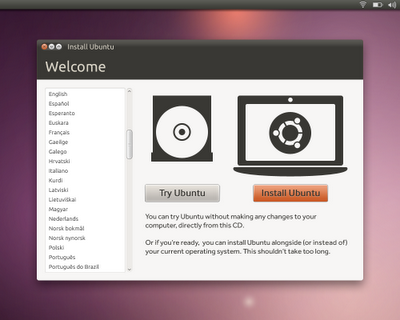
Ubuntu 10.10 Maverick comes with Simple user friendly installer. You can install Ubuntu 10.10 with limited computer knowledge. It also provide option for installing non-free software and codecs.

Partitioning is probably the most important part of installation process and it is also made simple in ubuntu 10.10.
Subscribe to:
Posts (Atom)
|
|---|


